KCS Exam Objectives and Materials
KCS Article
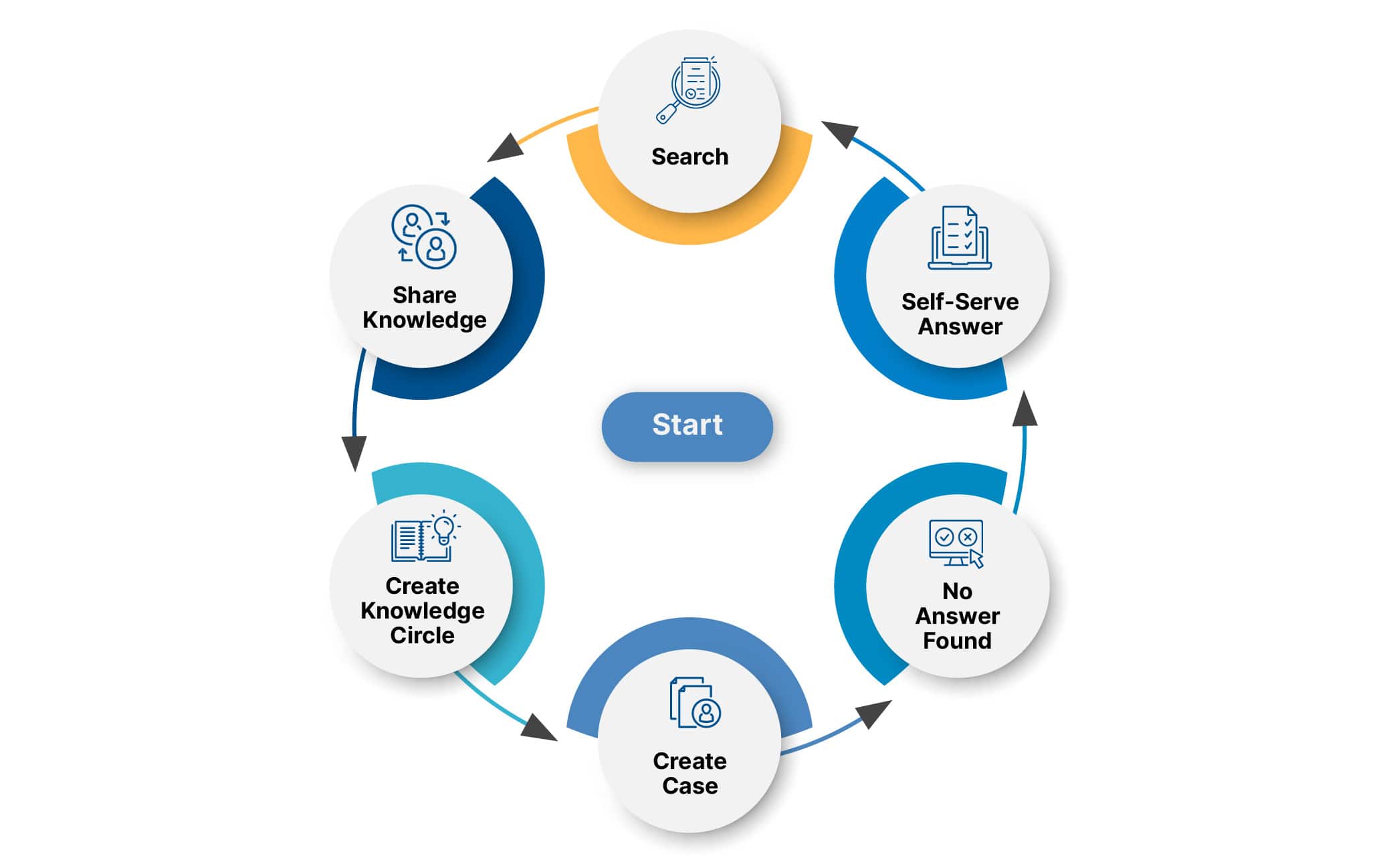
Technique 1.1: Capture Knowledge in the Moment (Exam Only)
- Technique 1.1: Capture Knowledge in the Moment
- Knowledge is created during issue resolution
- Knowledge creation is part of the Solve Loop
- Articles are visible immediately, even if incomplete
- Knowledge is a by-product of interaction
❌ Creating articles after resolution = NOT KCS
Key Concepts
- Search early, search often
- Searching is part of capture
- Prevents duplicate work
Context vs Content
- Context is as important as content
- Context can only be captured in the moment
- After-the-fact documentation loses context
- Once the answer is known, true problem framing is lost
Why Capture in the Moment
- Tacit knowledge becomes explicit during conversation
- Problem solving is creative and situational
- Clarifying questions improve accuracy
- Early capture improves findability and usability
Exam Traps
- Knowledge engineering = NOT KCS
- Writing later from memory = NOT KCS
- Perfect articles upfront = NOT KCS
Technique 1.2: Capture the Requestor’s Context (Exam Only)
- Technique 1.2: Capture the Requestor's Context
- Capture the requestor’s experience before resolving
- Use the requestor’s words and phrases
- Context = perception + environment
- Improves article findability and relevance
What Context Means
- How the issue appears to the requestor
- May be technically incorrect
- Technical accuracy NOT required in problem statement
- Technical accuracy REQUIRED in environment, resolution, cause
Why Capture Requestor Context
- Helps others find articles using similar language
- Incorrect perceptions are still valuable
- Frames articles for reuse and improvement
Every Search Has Value
- Search terms = requestor context
- Capture:
- Search strings
- Articles viewed
- Self-service activity
- Prevents dead ends for users
Self-Service and KCS
- Capture self-service searches
- Shows user effort was not wasted
- Speeds up assisted resolution
- Search terms improve or create articles
Reuse and Improvement
- If article exists → improve findability
- If article not findable → update using requestor context
- Reuse drives quality and visibility
Exam Traps
- Correcting requestor wording is NOT required
- Ignoring search activity = NOT KCS
- Expert-only language hurts findability
Technique 1.3: Searching is Creating
Capture Relevant Content (Exam Only)
- Capture only relevant information
- Goal: findable and usable articles
- Avoid long or redundant details
- Relevance requires responder judgment
Relevant Content Includes
- Requestor’s words and phrases (even if inaccurate)
- Environment statements relevant to the issue
- Environment must be true before and after resolution
- Distinguishing characteristics (often environment)
- Diagnostic process (link if complex)
- Resolution that fully solves the issue
Work in Progress (WIP) Articles
- Capture content before resolution
- Save article even without a solution
- Review relevance before WIP → Validated / Not Validated
- Remove environment details that proved irrelevant
Good Enough Rule
- Article does not need all scenarios
- Share what is known now
- Articles evolve through reuse
- Waiting for perfection = NOT KCS
Search Words = Candidate Knowledge
- Search terms capture requestor context
- Used to improve existing articles
- Used to create new articles
- Frame issue and environment
Why Save WIP Articles?
- Shows issue is already reported
- Allows linking other cases
- Speeds resolution
- Captures collective experience
KCS v6 Principles
KCS v6 Principles – Definitions (Exam Only)
KCS = Knowledge-Centered Service
Attributes of Knowledge
- Knowledge = information used to make decisions or take action
- Knowledge depends on the person and role
- Gained through interaction and experience
- Knowledge evolves over time
- Knowledge is never perfect or complete
- Shared knowledge > individual knowledge
Exam idea: “The smartest person in the room is all of us together.”
Service (KCS Meaning)
- Service = helping others be successful and productive
- Based on requester–responder interactions
- Exists across:
- Roles
- Teams
- Companies
- Not limited to IT or support
Principles and Core Concepts
Principle
- A fundamental belief
- Explains why we do things
- Applies across multiple practices
- Does NOT explain how
Core Concept
- Based on one or more principles
- More specific than principles
- Bridges principles and practices
Practice
- Practices organize what we do
- Apply principles and core concepts
- Help structure activities
- Made up of:
- Definition
- Techniques
- Applicable across many functions (IT, HR, finance)
Technique
- Techniques describe how we do things
- Action-oriented and implementable
- More granular than practices
- Multiple techniques make up a practice
Vocabulary (EXAM DEFINITIONS)
- Knowledge
- Information we can act on
-
By-product of interaction
-
Content
- Captured, findable knowledge
-
Text, images, audio, video, etc.
-
Network
- People + content sharing knowledge
-
No role, team, or company boundaries
-
Issue
- Question, problem, or exception
-
Triggers interaction
-
Knowledge Worker
-
Uses information to decide or act
-
Requestor
-
Knowledge worker seeking knowledge
-
Responder
- Knowledge worker providing knowledge
Exam Traps
- Principles ≠ techniques
- Practices ≠ tools
- Knowledge ≠ content
- KCS ≠ IT-only
Create Value (KCS v6 Principle – Exam Only)
Create Value - Knowledge is the product - All knowledge workers deliver knowledge, not just tasks - Value comes from reuse, improvement, and creation of knowledge
Work Tasks; Think Big Picture
- Tasks matter, but future value matters more
- Avoid focusing only on the transaction
- Balance:
- Solving the issue
- Capturing what is learned
Knowledge in the Workflow
- Knowledge base is embedded in daily work
- Reuse, improve, and create knowledge as a habit
- Proper KCS:
- Reduces rework
- Improves quality
- Does NOT increase handle time
Organizational Value
- Shared knowledge improves collective performance
- Reduces repetitive work
- Patterns emerge across interactions
KCS and Other Content
- KCS complements, not replaces:
- Technical documentation
- Policies
- Legal / regulatory content
- Not all knowledge requires the same control
Capture in the Moment
- Knowledge is a by-product of interaction
- Best captured in context of use
- Best creators are those who use it daily
Tacit vs Explicit Knowledge
- Tacit knowledge
- Known but hard to express without context
-
Emerges during interaction
-
Explicit knowledge
- Can be documented without demand
Exam Traps
- Task-only focus = ❌
- After-the-fact knowledge capture = ❌
- KCS replaces documentation = ❌
Demand Driven (KCS v6 Principle – Exam Only)
Demand Driven - Knowledge is a by-product of interaction - Demand determines: - What knowledge to capture - What knowledge has value - What knowledge gets validated
What Drives Knowledge Capture
- Capture knowledge based on real issues
- Reuse what exists
- Create knowledge only when needed
- Do NOT anticipate or fabricate issues
Demand Answers Key Questions
- What knowledge should we capture? → What is requested
- What knowledge is valuable? → What is reused
- How is knowledge validated? → Through reuse
Reuse = Review (Very Exam Important)
- Reused knowledge is validated
- Knowledge not reused does not get reviewed
- Best validators = people who use the knowledge
Just-in-Time vs Just-in-Case
- KCS is just-in-time
- Avoid just-in-case documentation
- Future value cannot be predicted accurately
Solve Loop and Evolve Loop
- Solve Loop
- Reuse, improve, or create knowledge
-
Validation happens through reuse
-
Evolve Loop
- Analyze reuse patterns
- Identify:
- High-impact improvements
- Process, policy, or product changes
- Predictive opportunities
Deterministic vs Non-Deterministic Work (Conceptual Only)
- Manufacturing = deterministic
- Problem solving = non-deterministic
- Resources and process emerge during work
- Context drives actions
Exam Traps
- Proactive mass documentation = ❌
- Reviewing unused articles = ❌
- Experts validate everything = ❌
- Predicting future issues = ❌
One-Line Exam Answer
What does demand-driven mean in KCS?
Knowledge capture, value, and validation are driven by real demand and reuse.
KCS - Core Concepts
Why KCS?
Value of KCS
- Captures and reuses collective experience
- Delivers value to:
- The business
- Customers
- Knowledge workers
- Breaks limits of traditional knowledge management
- Collective knowledge > individual knowledge
Benefits of KCS
1. Operational Efficiency
- Knowledge integrated into daily workflow
- Work includes:
- Reusing existing knowledge
- Improving knowledge
- Creating knowledge if missing
- Results:
- Reduced rework
- Increased capacity
- Faster onboarding
- Collective experience is more accurate than individual knowledge
2. Self-Service Success
- Knowledge created in context of demand
- Knowledge is:
- Findable
- Usable
- Enables users to solve issues independently
- Reduces dependency on finding “who knows”
- Frees experts for new challenges
3. Organizational Learning and Improvement
- Reuse patterns reveal:
- Process issues
- Policy gaps
- Product problems
- Enables:
- Root cause analysis
- High-impact improvements
- Improves productivity of those served
Aggregate Business Impact
- Lower operating cost per customer
- Higher productivity
- Better service outcomes with same or fewer resources
Organization as a Network
- Shifts organization from hierarchy to network
- Network connects:
- People to content (known issues)
- People to people (new issues)
- More agile than siloed structures
Why Organizations Adopt KCS
- Need to scale capabilities
- Limited staffing and budgets
- Increasing demand for knowledge
Exam Traps
- KCS is just documentation ❌
- KCS benefits only support ❌
- Tools create value ❌
- Individual expertise > collective knowledge ❌
Technique 6.2: Seamless Technology Integration (Exam Only)
Role of Technology in KCS
- Technology is a critical enabler of KCS
- Enables collaboration across people, time, and location
- Supports scaling KCS practices
- Tools enable KCS, but do not create value by themselves
KCS-Enabled Technology
- Many tools can enable KCS
- KCS Verified tools support core KCS behaviors
- Technology supports capture, reuse, and improvement
Capabilities of KCS-Verified Tools
Knowledge and Search
- Article object with search
- Separate problem vs environment content
- Granular search (problem ↔ problem, environment ↔ environment)
- Preserve search arguments for article creation
Article and Incident Management
- Link incidents ↔ articles
- Support article states and audiences
- Modify articles during reuse (license-based)
- Create articles from incident records
Metrics
- Reporting on reuse and linking
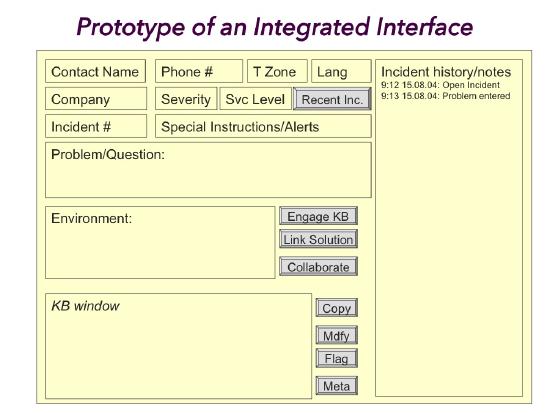
Integrated Workflow (Concept)
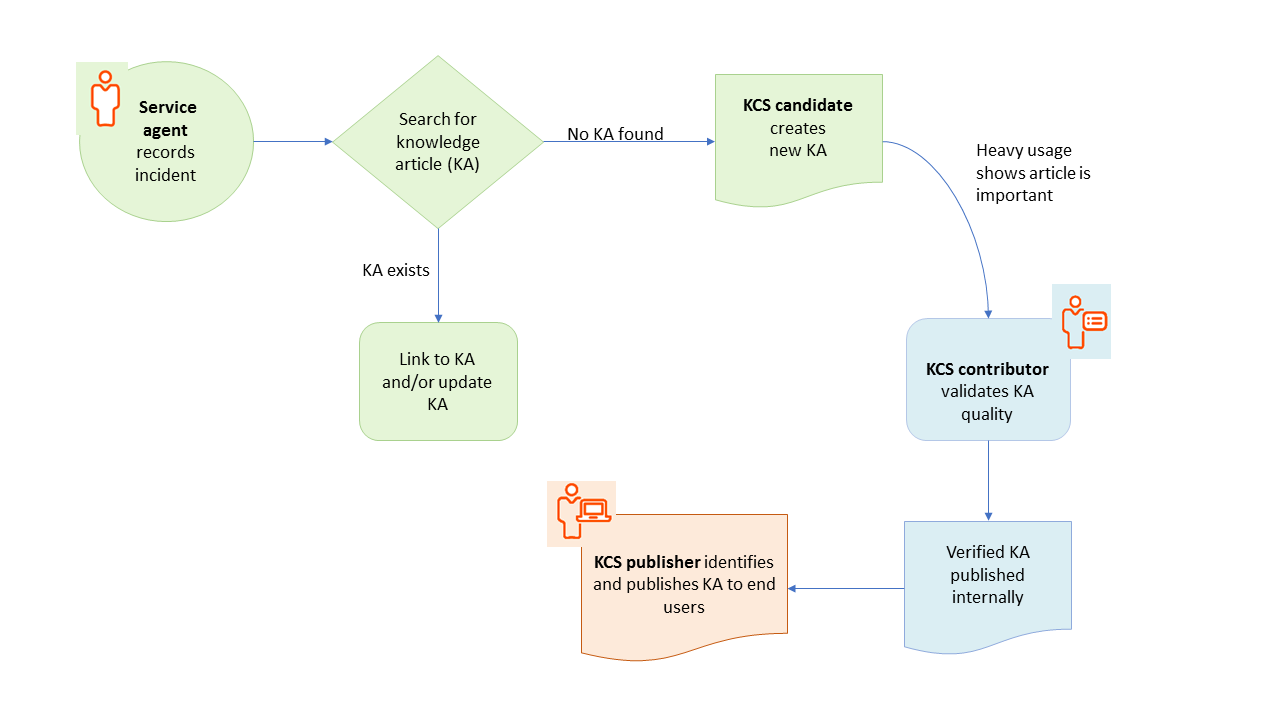
- Single workflow for case handling and knowledge use
- Closed incidents capture a snapshot of the article
- Articles continue to evolve after closure
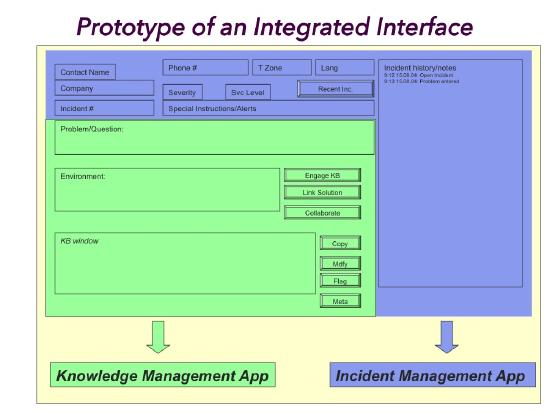
Start Small, Improve Continuously
- Tight integration is NOT required to start
- Many succeed with minimal integration
- Sustainability requires continuous improvement
- Coaches and KDEs guide integration evolution
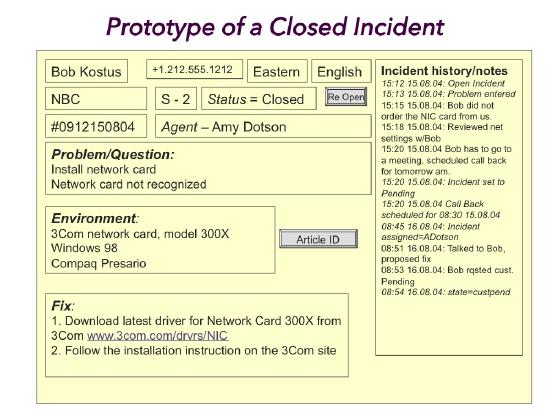
Workflow Design Considerations
The workflow below shows how an individual resolution might unfold.
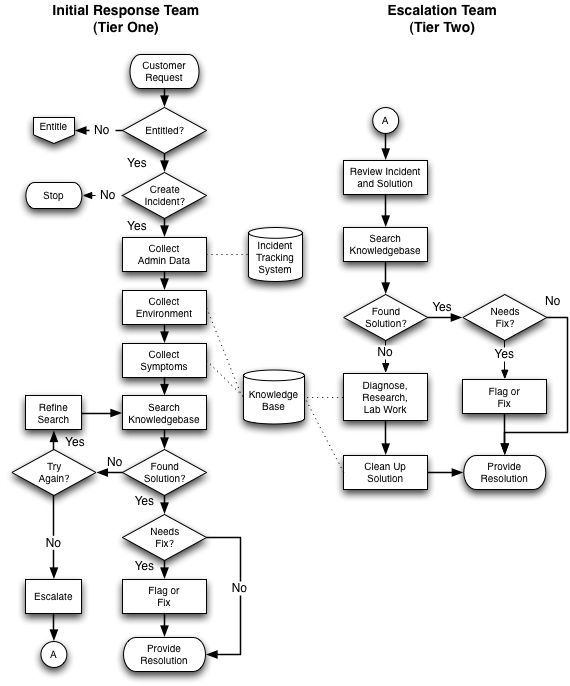
Complexity vs Volume
- High complexity / low volume → frequent KB use
- Low complexity / high volume → quick resolution, minimal searching
Quick Click / Favorites
- One-click reuse for common issues
- Increments article use count
- Feeds Evolve Loop pattern analysis
- Can notify responders of new info
Design Criteria (Key Themes)
- Eliminate separate tools
- Minimize context switching
- Make right behavior easy
- Avoid duplicate data entry
- Support problem-solving flow
Behavior Change Factors
- Tools
- Measures
- Recognition
- Understanding (WIIFM)
- Coaching
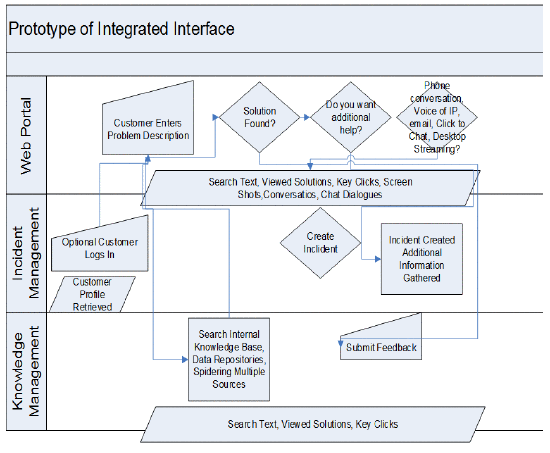
Self-Service Integration
- Deliver articles directly to users
- Self-service workflow differs from assisted support
- Enable smooth transition to assisted path
No Dead Ends
- Easy move from self-service → assisted support
- Preserve search terms and viewed articles
-
Use click-to-chat / click-to-submit
-
Self Service path feeds assisted support knowledge base
The Solve Loop (KCS Core Concept – Exam Only)
Solve Loop vs Evolve Loop
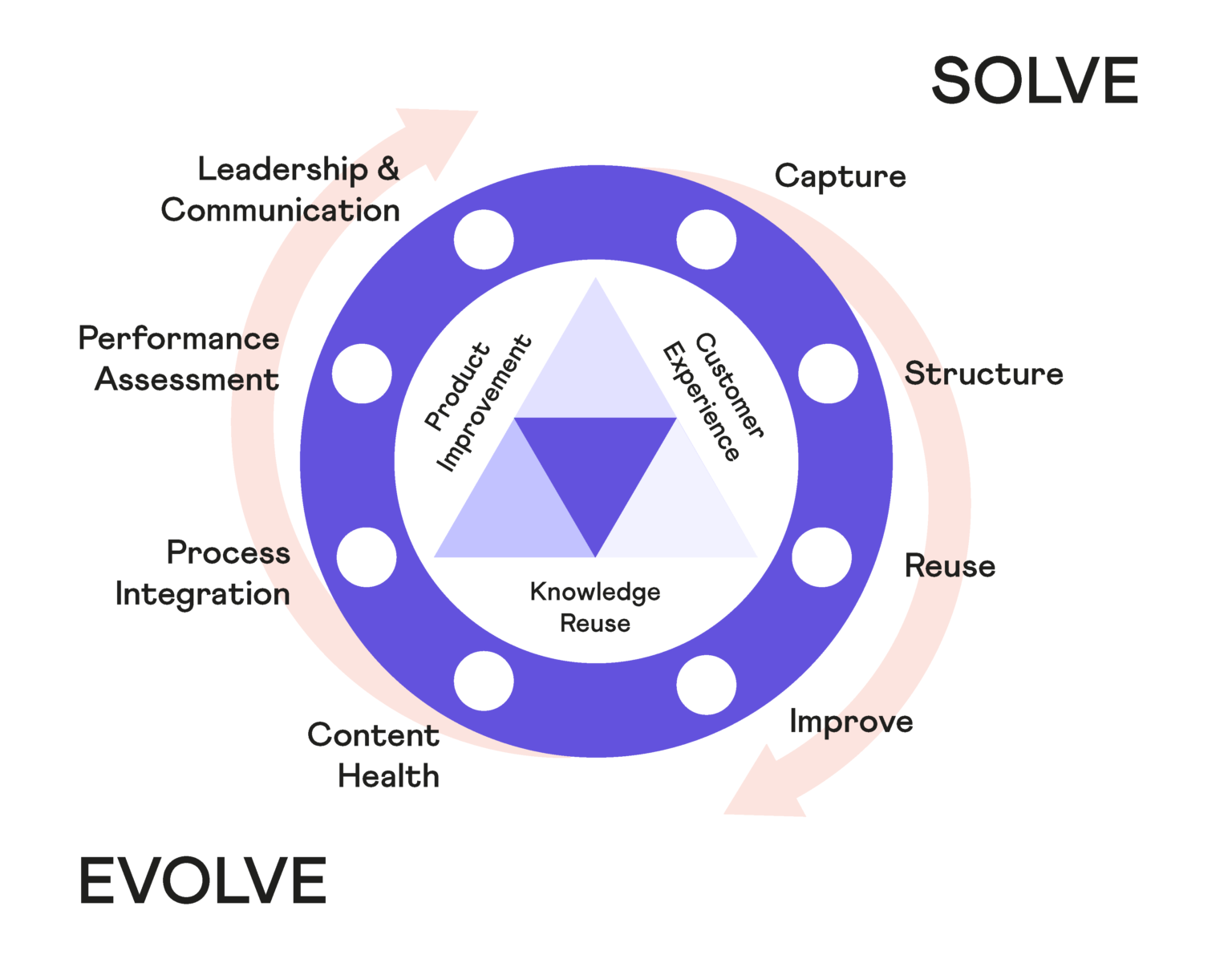
- Solve Loop = request–response work
- Evolve Loop = organizational learning
- Loops are interdependent
- Evolve Loop depends on correct Solve Loop behavior
Purpose of the Solve Loop
- Resolve requests efficiently
- Capture resolution experience
- Build collective memory
- Reduce rework
Characteristics of the Solve Loop
- Structured request–response workflow
- Light structure improves speed
- Too much structure is disruptive
- Knowledge base use improves accuracy
KCS Double Loop System
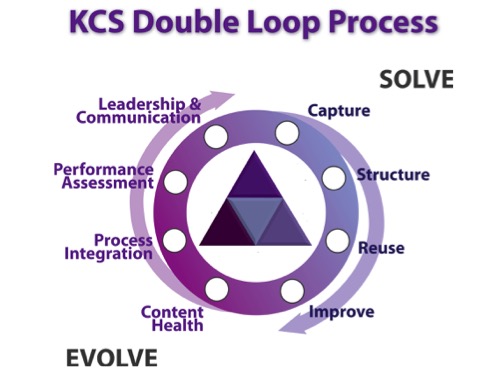
- Self-correcting system
- Patterns emerge from many correct actions
- Drives business improvement
Knowledge Practices in the Solve Loop
Capture
- Capture in the workflow
- Capture requestor context and responder knowledge
- Tacit knowledge becomes explicit
Structure
- Structure for reuse
- Simple templates and consistent format
- Faster identification of relevant knowledge
Reuse
- Search is part of solving
- Search early, search often
- Prevents duplicate work and articles
Improve
- Reuse is review
- Fix if confident and licensed
- Flag if not
- Shared ownership improves quality
Shift in Values
Traditional Model
- Individual focus
- Competition
- Hero culture
- Valued for what you know
KCS Model
- Collaboration
- Sharing
- Improvement
- Valued for ability to learn and help others learn
Performance Implications
- New assessment models required
- Measure collaboration and contribution
- Not individual heroics
Structure
Structure (Practice 2 – Exam Only)
Overview
- KCS uses a simple, consistent article structure
- Goal:
- Improve findability
- Improve readability
- Improve usability
- Simple structure:
- Provides context
- Improves search relevance
- Works well in multi-language environments
Why Structure Matters (Exam Idea)
- A little structure helps a lot
- Too much structure is disruptive
- Consistency enables:
- Faster creation
- Easier reuse
- Better collaboration
Techniques in This Practice
Technique 2.1: Use a Simple Template
Technique 2.2: Complete Thoughts, Not Complete Sentences
Technique 2.1: Use a Simple Template (Exam Only)
- Technique 2.1: Use A Simple Template
- KCS prescribes a standard article format
- Provides context for content
- Improves readability and consistency
- Helps articles integrate with existing knowledge
Core KCS Article Structure (Know This)
Issue
- The problem in the requestor’s words
- What is not working / what they are trying to do
- Everything here is resolved by the resolution
- May be vague (perception-based)
Environment
- Conditions required for the issue
- Examples:
- Product
- Platform
- Version
- Configuration
- Geography
- Must be true before and after resolution
- Should be precise
- Key driver of findability
- Distinguishes similar issues with different fixes
Resolution
- The answer or steps to fix the issue
- Fully resolves the issue
Cause (Optional)
- Underlying reason for the issue
- Usually for:
- Complex problems
- Defects
Metadata
- Article attributes such as:
- Audience
- Confidence
- Governance
- Dates
- Reuse count
- Modification history
Create As You Go (Very Exam Important)
- Capture content during the interaction
- Use the structure while working the issue
- Replace personal notes with a WIP article
- Benefits:
- Avoid duplicate work
- Enable collaboration
- Build knowledge in real time
Refinement After Resolution
- Review captured content
- Remove irrelevant environment details
- Ensure environment distinguishes this issue
- Update cause if appropriate
Structure and Self-Service
- Articles may link to:
- Manuals
- Docs
- Other references
- Supports different expertise levels
- Avoids overloading the article itself
Key Principle
- Start with one simple template
- Do NOT start with many templates
- Let experience drive future changes
Exam Traps
- Multiple templates upfront ❌
- Perfect structure before publishing ❌
- Environment = symptoms ❌
Technique 2.2: Complete Thoughts, Not Complete Sentences (Exam Only)
- Technique 2.2: Complete Thoughts Not Complete Sentences
- Capture knowledge in the moment
- Use short phrases, not full sentences
- Focus on clarity and speed
Why This Works
- Improves readability
- Faster to capture during interaction
- Easier to scan
- Better for non-native language readers
Work in Progress (WIP) Articles
- Notes responders already take → become WIP articles
- No extra work — just different placement
- Experience is:
- Structured
- Shareable
- Reusable
What KCS Is NOT Asking For
- Not technical writing
- Not polished prose
- Not perfect grammar
Exam Traps
- Full sentences required ❌
- Writing after the fact ❌
- Personal notes outside KB ❌
Reuse – Seek to Understand What We Collectively Know (Exam Only)
seek to understand what we collectively know”
Purpose of Reuse
- Prevent solving issues that are already solved
- Leverage collective experience
- Improve speed and accuracy of resolution
- Reduce rework and duplicate effort
Search During the Solve Loop
- Searching is part of the request–resolution process
- Enables:
- Finding existing solutions
- Learning from similar issues
- Supports solving new issues using past experience
Value of Work In Progress (WIP) Articles
- WIP articles are visible to others
- Helps identify:
- Similar issues
- Issues already being worked on
- Enables collaboration
- Major source of organizational learning
Search Early and Often (But Not Forever)
When to Search
- Start searching early
- Refine search as understanding improves
When to Stop Searching
- Stop when:
- Search refined a few times
- Issue description is clear
- Key environment characteristics are captured
- If no value is found → move to diagnosis
Exam idea: Searching supports solving, it does not replace it.
Search as a Skill
- Searching is a learned skill
- Coaches help responders:
- Improve search techniques
- Know when to stop searching
Why Searching Is Different from Google (Exam Trap)
- KCS search engines:
- Have less traffic
- Need more context
- More context = better results
- Short, vague searches are ineffective
Key KCS Search Behavior
- Use issue + environment context
- Refine searches iteratively
- Preserve search terms as candidate knowledge
- Searching improves both:
- Resolution speed
- Article quality
Exam Traps
- Search once only ❌
- Search forever ❌
- Skip searching and diagnose immediately ❌
- Assume Google-style searching works ❌
Reuse – Technique 3.3: Linking (Exam Only)
Improve
The Importance of Linking
- Linking connects a system of record (case, incident, email, chat, etc.) to a KCS article
- Critical for Evolve Loop analysis
- Enables:
- Link rate
- Reuse metrics
- New vs. known analysis
- Organizations that cannot link are at a disadvantage
Linking to an Existing KCS Article
- If a relevant article exists:
- Link it to the event
- Improve it with new symptoms or environment details
- Reuse always includes improvement
When No Article Exists
- Create a new article
- Usually starts as a WIP article
- Content already captured:
- Search terms (searching = creating)
- Requestor context
- Problem-solving notes
- Final steps:
- Add resolution (and cause if needed)
- Review environment relevance
- Set article state based on confidence and license
Referencing and Linking to Other Information Sources
- KCS articles should be short (≈ one page)
- Link to:
- Other KCS articles
- Manuals
- Policies
- Work instructions
- KCS articles act as a context-sensitive index
- Avoid duplication of content
Linking to Non-KCS Content (Allowed If ALL Apply)
- Content is in a maintained repository
- Specific answer is findable by search
- Accessible to the intended audience
- Written in the audience’s context
- If criteria met:
- Creating a new KCS article adds little value
- Links count toward reuse and link metrics
Rule of Thumb
- Avoid duplication
- Link instead of copying whenever possible
- If criteria are NOT met → copy content into the article
Managing Article Versions
- Articles evolve through reuse
- Must preserve what was delivered to the requestor
- Methods:
- Capture resolution in the incident
- Snapshot of article at delivery
- Link to specific article version (if supported)
Linking Requirements (Tool Behavior)
- Links must be:
- Structured (not just text hyperlinks)
- Available to reporting and search
- Responders must be able to:
- Link and unlink articles
- View current article and delivered version
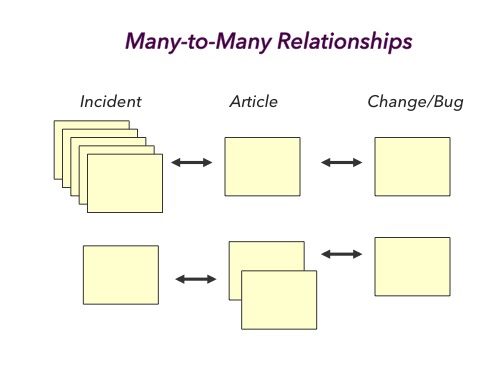
Many-to-Many Relationships (Very Exam Important)
- One incident → multiple articles
- One article → multiple incidents
- Optional link types:
- Resolved
- Referenced
Key Exam Traps
- Linking is optional ❌
- One incident = one article ❌
- Hyperlink in notes = valid linking ❌
- Articles should duplicate manuals ❌
Improve
Technique 4.1: Reuse Is Review (Exam Only)
Core Idea
- Reuse = review
- Articles are validated and improved when they are used
- Quality comes from day-to-day use, not separate review steps
- Knowledge base is collectively owned
Collective Ownership
- This is our knowledge base
- Represents the best we know right now
- Anyone interacting with an article is responsible for its quality
- Best validators = people who use the article
Why We Improve During Reuse
- We cannot predict future value of knowledge
- If an issue is worth solving → it is worth saving
- Capture everything, let reuse determine value
The 80/20 Rule (Very Exam Important)
- ~80% of articles are rarely reused
- ~20% of articles solve ~80% of issues
- This pattern is normal and expected
- We do NOT pre-judge which articles matter
Demand-Driven Quality
- Articles that are reused get improved
- Articles never reused are not reviewed
- Prevents wasted effort
- Makes KCS scalable and efficient
Self-Service Impact (Exam Context)
- Self-service demand is much higher than assisted support
- Many issues are:
- Solved via self-service
- Never logged as incidents
- We lack context to predict what knowledge will be valuable later
Early Adoption Behavior
- Let reuse identify valuable articles
- Improve only what is being used
- No dedicated QA or editorial team required
- Avoid after-the-fact knowledge engineering
Built Proficiency Phase
Just-in-Time Publishing
- Enough Publishers to publish quickly
- Fast feedback loop required
- Requestors participate by:
- Reporting unclear articles
- Reporting incorrect resolutions
- Corrections must be fast
What NOT to Do (Exam Traps)
- Review every article ❌
- Pre-approve all articles ❌
- Editorial QA teams ❌
- Delay publishing for perfection ❌
Solve Loop Responsibility
- Responders are responsible for:
- Articles they use
- Fixing or flagging issues
- Each reuse improves article quality
- Focus effort only where value exists
Key Exam Lines (Memorize)
- Reuse is review
- If it’s worth solving, it’s worth saving
- The best people to review knowledge are the people who use it
Improve – Technique 4.2: Flag It or Fix It (Exam Only)
Core Idea
- Everyone is responsible for article quality
- Rule: Flag it or Fix it
- Improvements are driven by real use (demand)
- Reinforces collective ownership
Flag It vs Fix It
Fix It
- Do it if:
- You are confident
- You have the correct KCS license
- Fix immediately, in the moment
Flag It
- Do it if:
- You are not confident
- You lack the license
- Flag triggers review by SME or Publisher
Applies to: - Content standards - Technical accuracy - Completeness
Fix It vs Create a New Article
When to Create a New Article
- A unique resolution is required
- For a specific environment
- No existing article (or maintained source) exists
Judgment is required.
One Article per Resolution (Guideline)
- Generally:
- One article per resolution and cause
- Same issue + different environments + different resolutions → separate articles
- Not an absolute rule — driven by clarity for the audience
Multiple Resolutions in One Article (Allowed)
- Same cause, different resolution options:
- Temporary workaround
- Permanent fix
- Each option should explain:
- Effort
- Impact on the user
Work in Progress (WIP) Articles
- WIP articles are valuable
- Even without a resolution:
- Show issue is being worked
- Prevent duplicate effort
- Enable collaboration
- Never judge future value:
- If it’s worth solving, it’s worth saving
Do NOT Overextend Articles
- Do not try to cover all possible scenarios
- Resolve the requestor’s issue
- Expand only if reuse demands it
- Problem statements evolve over time
Acceptable Redundancy (Healthy)
Redundancy is OK when it helps clarity.
Examples
- Same issue, different audiences
- Different experiences, same resolution and cause
- Different issues, same resolution but different causes
Redundancy becomes a problem only when it harms: - Findability - Usability
Duplicate Articles (Inevitable)
- Duplicates happen in healthy KCS environments
- Two causes:
Productive Duplication (Normal)
- Different wording or environments
- Articles evolve through reuse
- Eventually both appear in search
- Then → merge
Problematic Duplication (Anti-KCS)
Caused by: - Article creation goals - Not searching early/often - Fear of editing “others’” articles - Individual ownership culture
Dealing with Duplicates: The Merge (Very Exam Important)
Merge Rule
- Merge newer article(s) into the oldest
- Archive or delete newer articles
Why Keep the Oldest
- Preserve:
- Metadata
- History
- Original incident links
- Reuse counts
- Older article usually richer
- Less work overall
Key Exam Traps
- Ignore bad content ❌
- Create new article instead of fixing ❌
- Delete oldest article ❌
- Avoid editing others’ articles ❌
- Try to predict future value ❌
Content Health
- Identify the importance of a Content Standard.
- Identify the purpose of the metadata field for Article Confidence.
- Identify the purpose of the metadata field for Article Audience (formerly Visibility).
- Identify the benefits of Just-In-Time publishing.
- Identify the elements of the KCS methodology that contribute to the creation of quality KCS articles.
Content Health – Technique 5.3: Developing a Content Standard (Exam Only)
Purpose of a Content Standard
- Defines how articles should be written
- Promotes:
- Consistency
- Predictability
- Quality
- Communicates expectations across the organization
- Implemented as:
- Formal document
- Template
- Help text in tools
How Much Structure Is Enough?
- Enough to:
- Capture required information
- Maintain consistency
- Not so much that it slows capture
- Balance is critical
Standardization vs Customization
- 70–80% of the content standard is common across organizations
- 20–30% is tailored to:
- Knowledge domain
- Division
- Organization
- Avoid over-customization
What a Content Standard Must Define (Know This List)
Article Structure
- Fields and definitions for:
- Issue
- Environment
- Resolution
- Cause
- Metadata
Good vs Bad Examples
- Shows contrast
- Reinforces intent of field definitions
- Helps people learn faster
Metadata Definitions
- What each attribute means
- How it is set:
- Manual
- Automated
- Implications of each value
Article Confidence
- Defined by article state
- Indicates reliability of content
Article Audience
- Who can see the article
- Internal vs external access
- Defined by article state
Article Governance
- Required for:
- Compliance
- Legal
- High-risk content
- Defined by article state
Templates
- List of available templates
- Criteria for when to use each
- Instructions for filling fields
- Keep number of templates low
Style Guide
- Preferred writing style
- Tone and voice
- Supports readability and reuse
Supporting Material
- Rules for:
- References
- Links
- Avoid duplication
- Ensure relevance
Vocabulary
- Preferred terms per audience
- Consistent:
- Product names
- Versions
- Platforms
- Supports:
- Findability
- Trademark protection
Multi-Language Considerations
- Writing guidelines for easier translation
- Promote International English
- Improves global usability
Multimedia Considerations
- When to use:
- Images
- Video
- Audio
- Based on:
- Audience
- Content type
Quick Reference Guide
- One-page writing aid
- Tips and reminders
- Aligned with full content standard
Ownership of the Content Standard
- Owned by knowledge workers
- Designed by a cross-functional team
- Created by people who:
- Use the content
- Create the content
Enterprise Considerations (Exam Trap)
- Different groups may have different standards
- Must still align with enterprise-wide needs
- Avoid fragmentation
Key Exam Traps
- Content standard owned by QA ❌
- One-off documentation effort ❌
- Heavy governance for all content ❌
- Unlimited templates ❌
Content Health – Technique 5.2: KCS Article State (Exam Only)
What Is Article State
- Article state is defined by three metadata fields:
- Confidence
- Audience
- Governance
- Article state controls:
- Trust
- Visibility
- Who can create or modify content
- State changes as articles are used and improved
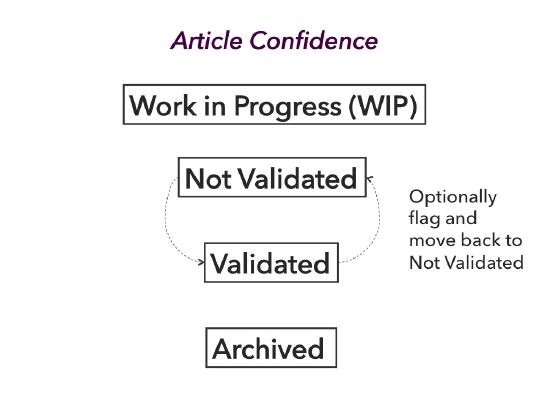
Article Confidence
- Indicates how confident we are in the article
- Supports the article life cycle
- Knowledge is never complete → confidence evolves
- Life cycle is non-linear
Confidence States
Work in Progress (WIP)
- No resolution yet
- Issue + some environment captured
- Created early (often at first search)
- Purpose:
- Avoid duplicate work
- Enable collaboration
- Temporary state
When incident closes: - Delete WIP if resolved by existing article - Move to Not Validated or Validated if resolution added - Archive/delete if no value captured
Not Validated
- Article has a resolution
- Confidence is low
- Common reasons:
- No reuse yet
- Created by KCS Candidate
- Not fully compliant with content standard
- Supports capture everything
- Users must apply judgment before using
Efficiency rule: - Do NOT review all Not Validated articles - Let reuse drive review
Validated
- Article is complete and reusable
- Confidence comes from:
- User confirmation
- Responder validation
- Experience
- Must comply with content standard
- Created or reviewed by licensed users
Archived
- Used to remove articles from search
- Preferred over deletion
- Preserves:
- Links
- History
- Can be restored later
Confidence Transitions (Exam Logic)
WIP → Not Validated
- Resolution added
- Low confidence or created by Candidate
WIP → Validated
- Licensed user
- Confident resolution
- Content standard met
Not Validated → Validated
- Reused by licensed user
- Confidence gained
- Content standard met
Any State → Archived
- No longer valuable
- Removed from search, not deleted
Demand-Driven Review Rule (Very Exam Important)
- Do NOT review articles without demand
- Reuse = review
- Exceptions:
- Coach + Candidate work
- Evolve Loop analysis
Article Audience (Who Gets to See What)
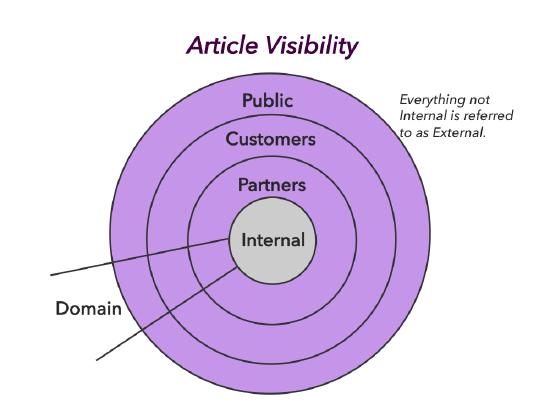
- Controls visibility
- Business rules use:
- Audience
- Confidence
Audience Levels
- Internal – employees only
- Within a Domain – specific group
- Partners – trusted external users
- Customers – registered users
- Public – anyone (e.g. Google indexed)
Anything beyond Internal = External
Demand-Based External Visibility
- Early adoption:
- External visibility based on reuse
- This is temporary
- Mature KCS:
- Just-in-time publishing
- Articles shared externally quickly
90/0 Goal (Exam Favorite)
- 90% of articles available externally
- At or before case closure
- Drives self-service success
Publisher Responsibilities
- Publishers can modify Validated articles
- Non-publishers:
- Flag articles
- Set to Not Validated for review
- Do NOT remove risky public articles silently
- Escalate if customer harm is possible
Article State Matrix
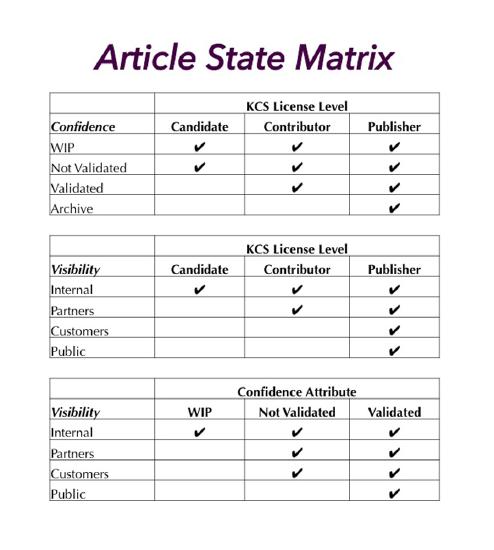
- Maps:
- Audience
- Confidence
- Governance
- Defines access rules
- Recommended reference document
Article Governance (Who Can Create or Modify)
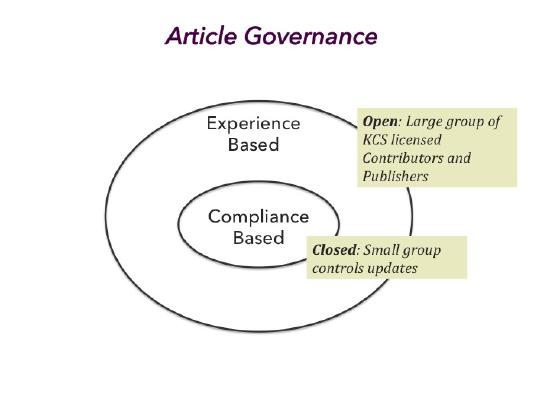
Experience Based
- Open governance
- Most common
- Many contributors
- License controls confidence and audience
Compliance Based
- Restricted governance
- For:
- Policy
- Legal
- Regulatory content
- Only designated users can modify
- Everyone can comment
KCS Stagnation (Very Exam Important)
- Occurs when article flow stops
- Common causes:
- No self-service
- Articles not made external
- Result:
- No reduction in repeat issues
- Participation drops
- KCS fails
Key rule: - Articles being reused must flow forward
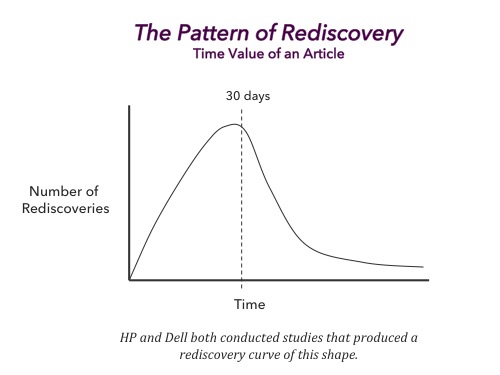
Time Value of a KCS Article
- Knowledge value declines rapidly
- Major loss after ~30 days
- Traditional publishing (60–90 days) misses value
- KCS supports just-in-time accuracy
Key Exam Traps
- Review everything ❌
- WIP articles are bad ❌
- Not Validated articles are useless ❌
- External only after heavy reuse ❌
- Delete instead of archive ❌
Process Integration
seek to understand before seeking to solve
Process Integration – Technique 6.1: Structured Problem Solving (Exam Only)
Purpose of Structured Problem Solving
- Provides guidance on how to use Solve Loop practices
- Solve Loop is not linear
- Practices are used as needed
- A little structure improves outcomes
- KCS article is created as a by-product
Solve Loop and Evolve Loop Context
- Solve Loop = individual request handling
- Evolve Loop = organizational learning
- Evolve Loop encompasses the Solve Loop
- Each Solve Loop task contributes to Evolve Loop value
Core Concepts Used
- Seek to understand before seeking to solve
- Search early, search often
- Capture context first, then look for existing knowledge
Structured Problem Solving Flow (Exam Logic)
1. Preserve the Requestor’s Perspective
- Capture the issue literally
- Use requestor’s words
- Do NOT jump to diagnosis
2. Search the Knowledge Base
- Search early
- Refine search as understanding improves
- Look for:
- Exact matches
- Similar issues
- Link and improve if found
3. Refine Understanding
- Ask clarifying questions
- Capture additional environment details
- Continue searching as context improves
4. Diagnose (Only If Needed)
- Begin diagnostics after searching
- Use experience and tools
- Continue asking questions
- Check KB frequently
5. Collaborate or Escalate
- If unresolved:
- Collaborate with peers
- Escalate for deeper research
- Knowledge capture continues
Different Skills at Different Points (Exam Important)

- Early phase:
- Listening
- Capturing context
- Searching
- Later phase:
- Diagnosis
- Technical analysis
- Jumping to diagnosis too early causes:
- Missed articles
- Wrong assumptions
- Lost learning
Managing the Conversation

- Minimize system switching
- Handle:
- Admin tasks at start (contact initiation)
- Admin tasks at end (wrap-up)
- Do NOT interrupt problem solving with admin work
Enabling Collaboration
- Problem solving is collaborative
- KCS encourages collaboration by design
- Move from escalation → collaboration
Intelligent Swarming (Conceptual – Exam Recognize)
- Connect people to people for new issues
- Complement to KCS connecting people to content
- Based on relevance, not hierarchy
Why Traditional Escalation Fails
- Skills-based routing:
- Hard to maintain
- Quickly outdated
- Expertise changes frequently
- Static profiles do not scale
People Profiles (Emerging Concept)
- Capture:
- Experience
- Interests
- Maintained programmatically
- Tunable by individuals
- Improves collaboration relevance
Examples of Enabling Collaboration
- Built-in chat / messaging
- Find people based on:
- Incident data
- WIP articles
- Directed swarm:
- Team owns resolution
- Individual owns response
- Visibility into open incidents
- Opt-in help model
Key Exam Traps
- Solve Loop is linear ❌
- Diagnose first ❌
- Work alone ❌
- Escalation-only model ❌
- Admin tasks throughout call ❌
Performance Assessment, Roles, and Responsibilities
- Identify the importance of the licensing model.
- Identify the benefits of the licensing model to the individual KCS Publisher.
- Identify the characteristics, role, value, and function of a KCS Coach.
- Identify ways to promote and measure the KCS behaviors and collaboration.
- Identify the strengths of radar charts.
- Identify the characteristics of an activity measure.
Technique 7.1: KCS Roles and the Licensing Model (Exam Only)
Core Idea of KCS Licensing
- KCS uses a licensing model, not job titles
- Licenses define:
- Rights
- Privileges
- Responsibilities
- Licenses are earned through demonstrated behavior
- Licenses can be revoked for poor judgment
Licensing Metaphor (Understand, Not Memorize)
- Like learning to drive:
- Start with limited rights
- Gain independence with experience
- More rights = more responsibility
- Classroom learning ≠ competence
- Skills become natural through practice
KCS Roles (Big Picture)
- Knowledge Workers – anyone responding to requests
- Leaders – define vision, support standards and workflow
- KCS Candidates
- KCS Contributors
- KCS Publishers
- KCS Coaches
- Knowledge Domain Experts (KDEs)
KCS Candidate
What a Candidate Can Do
- Understand KCS basics
- Use structured problem solving
- Capture requestor context
- Search and find articles
- Link or flag articles
- Modify their own articles
- Create:
- Work in Progress (WIP)
- Not Validated articles
Key Limits
- Cannot validate articles
- Cannot publish externally
- Must not use articles they do not understand
KCS Contributor
What a Contributor Can Do
- Finish and validate articles
- Ensure compliance with content standard
- Create Validated articles
- Improve Internal articles directly
- Flag External articles for review
- Decide when an article is “sufficient to solve”
Key Differences from Candidate
- Higher confidence
- Independent judgment
- No Coach review required
KCS Publisher
What a Publisher Can Do
- Set article audience to External
- Modify externally visible content
- Publish to web / partners / customers
- Apply broader audience judgment
- Understand:
- External audience
- Copyright
- Trademark
- Publishing risks
Exam Insight
- Publisher ≠ editor
- Publisher ≠ approver of everything
- Publisher must protect customers
The KCS License
- Licenses are:
- Earned
- Renewed
- Revocable
- Progression based on:
- Consistent behavior
- Demonstrated judgment
- Exams (often)
- Coach recommendation (often)
- Not tied to:
- Job title
- Support tier
- Seniority
Variations in Licensing (Exam Awareness)
All are valid:
- Two-level model (Contributor + Publisher)
- Combined roles
- One-level model with revocation on poor behavior
Key idea: - Trust level determines model
KCS Coach (Very Exam Important)
Role Purpose
- Change agent
- Skill developer
- Reinforces correct behavior
Key Responsibilities
- Coach Candidates → Contributors → Publishers
- Review Candidate articles
- Reinforce workflow and standards
- Provide feedback to individuals and management
- Participate in KCS Council
Important Exam Point
- Coaches should be part-time
- Full-time Coaches lose credibility
Knowledge Domain Expert (KDE)
Role Purpose
- Owns knowledge health for a domain
- Drives Evolve Loop value
Core Responsibilities
- Identify high-value content
- Perform pattern and trend analysis
- Reduce duplicates
- Improve reuse (internal & external)
- Drive:
- Product improvements
- Process improvements
- Policy improvements
- Perform:
- Known vs New analysis
- Participate in KCS Council
Knowledge Domains (Understand Concept)
- Logical collections of articles
- Based on:
- Product family
- Function
- Technology
- Domains:
- Overlap
- Are not rigid
- Purpose:
- Pattern analysis
- Clustering
- Business insight
KCS Council
Purpose
- Guide adoption → sustain improvement
- Cross-functional
- Global representation
Responsibilities
- Improve:
- Content standard
- Workflow
- Tools
- Reporting
- Support continuous improvement
- Shift focus from adoption to optimization
Distribution of Roles (Exam Logic)
Early KCS Adoption
- Many Candidates / Contributors
- Coach ratio: 1:5 – 1:8
- No KDE yet
Mature KCS Environment
- More Publishers
- Coach ratio: ~1:50
- Active KDEs
- Just-in-time publishing
Ultimate Role Goals
- High complexity environments:
- Majority = Publishers
- Low complexity environments:
- Enough Publishers to avoid backlog
- Zero “waiting to publish” articles
Key Exam Traps
- KCS roles = job titles ❌
- Only senior staff can be Publishers ❌
- Coaches must be full-time ❌
- Publishers approve everything ❌
- Knowledge quality = QA team ❌
Performance Assessment
Technique 7.3: Assessing the Creation of Value (Exam Only)
Core Principle: Create Value, Not Activity
- KCS measures value creation, not busyness
- Never put goals on activities
- Goals must be set on outcomes
- Activities are used for trend observation only
Goals on activities will corrupt the knowledge base.
Measures for Individuals and Teams
Balanced Scorecard Concepts (Applied to KCS)
- Link individual goals → team → organization
- Measure from multiple perspectives:
- Customer
- Employee
- Business
- Distinguish:
- Leading indicators (activities)
- Lagging indicators (outcomes)
Activities vs Outcomes (Very Exam Important)
Leading Indicators (Activities)
- Easy to measure
- Easy to game
- Examples:
- Article creation
- Article linking
- Article modification
❌ Never put goals on these
Lagging Indicators (Outcomes)
- Hard to measure
- Hard to game
- Measured after the fact
- Examples:
- Content Standard Checklist %
- Customer success
- Reuse by others (citations)
✅ Goals belong here
Why Goals on Activities Are Dangerous
Putting goals on activities will:
- Create unwanted behavior
- Destroy indicator value
- Reduce judgment
- Corrupt the knowledge base
- Shift focus to gaming
- Lower morale
- Make leadership ineffective
Triangulation — Who Is Creating Value?
Why Triangulation Is Needed
- Value is intangible
- No single metric proves value
- Must correlate multiple views
The 3 Required Perspectives
- Activity trends (no goals)
- Outcome performance (with goals)
- Content Standard Checklist (quality)
Think GPS: multiple signals → accurate position
Make Trends Visible to Knowledge Workers
- Trends act like a dashboard
- Knowledge workers must see:
- How they’re doing
- Impact of their work
- Lack of visibility → disengagement
Goals for Outcomes, Not Activities (Again, Yes)
- Activities ≠ value
- Trends show behavior direction
- Outcomes show success
- Conversations must focus on:
- Behavior
- Process
- Understanding
- Never focus conversations on numbers
Knowledge Worker Visibility to Measures
What Visibility Should Do
- Enable self-correction
- Show impact
- Support coaching
What Visibility Must Avoid
- Self-imposed activity goals
- Competition on numbers
- Score obsession
KCS Reports — Key Patterns
KCS Article Creation and Reuse
- Early adoption:
- Creation ↑
- Reuse starts
- Maturity:
- Creation ↓
- Reuse ↑
- Pattern repeats with new products
KCS Article Life Cycle Trend
- Healthy system shows flow:
- Not Validated → Validated → External
- Bottlenecks indicate:
- Not enough Publishers
- Process issues
Link Rate as an Indicator
Definition
Link Rate = Incidents with articles linked / Applicable incidents closed
What Link Rate Shows
- Adoption of Solve Loop
- Knowledge base usage
Healthy Range
- 60–80% (context dependent)
⚠️ Never put a goal on link rate
Individual Profiles (Why Single Metrics Fail)
- High link rate ≠ value
- High creation ≠ quality
- Must analyze:
- Reuse by others
- Modifications
- Duplicates
- Quality checklist
Content Standard Checklist + PAR
Why Both Are Required
- Checklist = content quality
- PAR = workflow adherence
- Together they show:
- Understanding
- Judgment
- Real contribution
Radar Charts — Value Footprint
Purpose
- Fast visual assessment
- Balanced view of performance
Rules
- Activities → compared to team average
- Outcomes → compared to goal
- No goals on activities
What Radar Charts Show
- Who is creating value
- Who needs coaching
Is What We Talk About Important? (Yes.)
- Talk about:
- Behavior
- Process
- Understanding
- Do NOT talk about:
- “Fix your numbers”
- Numbers are indicators, not objectives
Team Performance — Management Effectiveness
- Radar charts apply to teams too
- Example team indicators:
- Customer loyalty
- Employee loyalty
- Collaboration health
- Support cost
- Avg Time to Relief
- Web self-service success
Judgment is always required.
Focus Shift Through Phases of Adoption
Early Adoption Focus
- Learning
- KCS competency levels
- Article creation / modify / reuse trends
- Content Standard Checklist
- Time to proficiency
Mature KCS Focus
- Collaboration
- Peer reuse (citations)
- Customer success
- Team outcomes
- Loyalty metrics
Summary: Performance Assessment (Exam Gold)
- Measure value, not activity
- Distinguish activities vs outcomes
- Never put goals on activities
- Use triangulation
- Use Content Standard Checklist + PAR
- Focus conversations on behavior
- Enable visibility and feedback
- Evolve measures as KCS matures