Reuse
Reuse – Seek to Understand What We Collectively Know (Exam Only)
seek to understand what we collectively know
Purpose of Reuse
- Prevent solving issues that are already solved
- Leverage collective experience
- Improve speed and accuracy of resolution
- Reduce rework and duplicate effort
Search During the Solve Loop
- Searching is part of the request–resolution process
- Enables:
- Finding existing solutions
- Learning from similar issues
- Supports solving new issues using past experience
Value of Work In Progress (WIP) Articles
- WIP articles are visible to others
- Helps identify:
- Similar issues
- Issues already being worked on
- Enables collaboration
- Major source of organizational learning
Search Early and Often (But Not Forever)
When to Search
- Start searching early
- Refine search as understanding improves
When to Stop Searching
- Stop when:
- Search refined a few times
- Issue description is clear
- Key environment characteristics are captured
- If no value is found → move to diagnosis
Exam idea: Searching supports solving, it does not replace it.
Search as a Skill
- Searching is a learned skill
- Coaches help responders:
- Improve search techniques
- Know when to stop searching
Why Searching Is Different from Google (Exam Trap)
- KCS search engines:
- Have less traffic
- Need more context
- More context = better results
- Short, vague searches are ineffective
Key KCS Search Behavior
- Use issue + environment context
- Refine searches iteratively
- Preserve search terms as candidate knowledge
- Searching improves both:
- Resolution speed
- Article quality
Exam Traps
- Search once only ❌
- Search forever ❌
- Skip searching and diagnose immediately ❌
- Assume Google-style searching works ❌
Reuse – Technique 3.3: Linking (Exam Only)
The Importance of Linking
- Linking connects a system of record (case, incident, email, chat, etc.) to a KCS article
- Critical for Evolve Loop analysis
- Enables:
- Link rate
- Reuse metrics
- New vs. known analysis
- Organizations that cannot link are at a disadvantage
Linking to an Existing KCS Article
- If a relevant article exists:
- Link it to the event
- Improve it with new symptoms or environment details
- Reuse always includes improvement
When No Article Exists
- Create a new article
- Usually starts as a WIP article
- Content already captured:
- Search terms (searching = creating)
- Requestor context
- Problem-solving notes
- Final steps:
- Add resolution (and cause if needed)
- Review environment relevance
- Set article state based on confidence and license
Referencing and Linking to Other Information Sources
- KCS articles should be short (≈ one page)
- Link to:
- Other KCS articles
- Manuals
- Policies
- Work instructions
- KCS articles act as a context-sensitive index
- Avoid duplication of content
Linking to Non-KCS Content (Allowed If ALL Apply)
- Content is in a maintained repository
- Specific answer is findable by search
- Accessible to the intended audience
- Written in the audience's context
- If criteria met:
- Creating a new KCS article adds little value
- Links count toward reuse and link metrics
Rule of Thumb
- Avoid duplication
- Link instead of copying whenever possible
- If criteria are NOT met → copy content into the article
Managing Article Versions
- Articles evolve through reuse
- Must preserve what was delivered to the requestor
- Methods:
- Capture resolution in the incident
- Snapshot of article at delivery
- Link to specific article version (if supported)
Linking Requirements (Tool Behavior)
- Links must be:
- Structured (not just text hyperlinks)
- Available to reporting and search
- Responders must be able to:
- Link and unlink articles
- View current article and delivered version
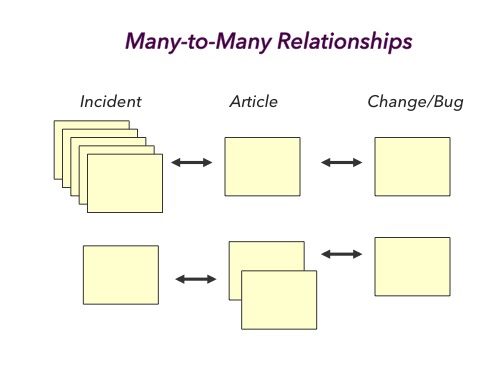
Many-to-Many Relationships (Very Exam Important)
- One incident → multiple articles
- One article → multiple incidents
- Optional link types:
- Resolved
- Referenced
Key Exam Traps
- Linking is optional ❌
- One incident = one article ❌
- Hyperlink in notes = valid linking ❌
- Articles should duplicate manuals ❌